Automated trading tools like TradersPost and PineConnector help you execute TradingView alerts directly with your broker. The choice depends on your trading style, broker needs, and budget:
- TradersPost: A cloud-based platform ($49.99/month) that supports multiple brokers (e.g., Interactive Brokers, TD Ameritrade, Coinbase) and asset classes (stocks, options, crypto). No hardware setup is needed, as it works entirely online. Ideal for multi-asset traders.
- PineConnector: A locally installed tool ($29.90/month) that connects TradingView to MetaTrader 4/5. Requires your computer or VPS to run continuously. Best for forex and CFD traders using MetaTrader.
Quick Comparison
| Feature | TradersPost | PineConnector |
|---|---|---|
| Price | $49.99/month | $29.90/month |
| Execution Method | Cloud-based | Local (PC/VPS required) |
| Supported Platforms | MT4/MT5, Interactive Brokers, TradeStation, TD Ameritrade, Coinbase, more | MetaTrader 4/5 only |
| Asset Classes | Stocks, options, crypto, forex | Forex, CFDs |
| Latency | 500–800ms | As low as 1ms (with VPS) |
| Reliability | 99.9% uptime | Hardware-dependent |
TradersPost suits traders managing diverse strategies across brokers, while PineConnector is better for those focused on MetaTrader forex setups. Choose based on your trading goals and technical preferences.
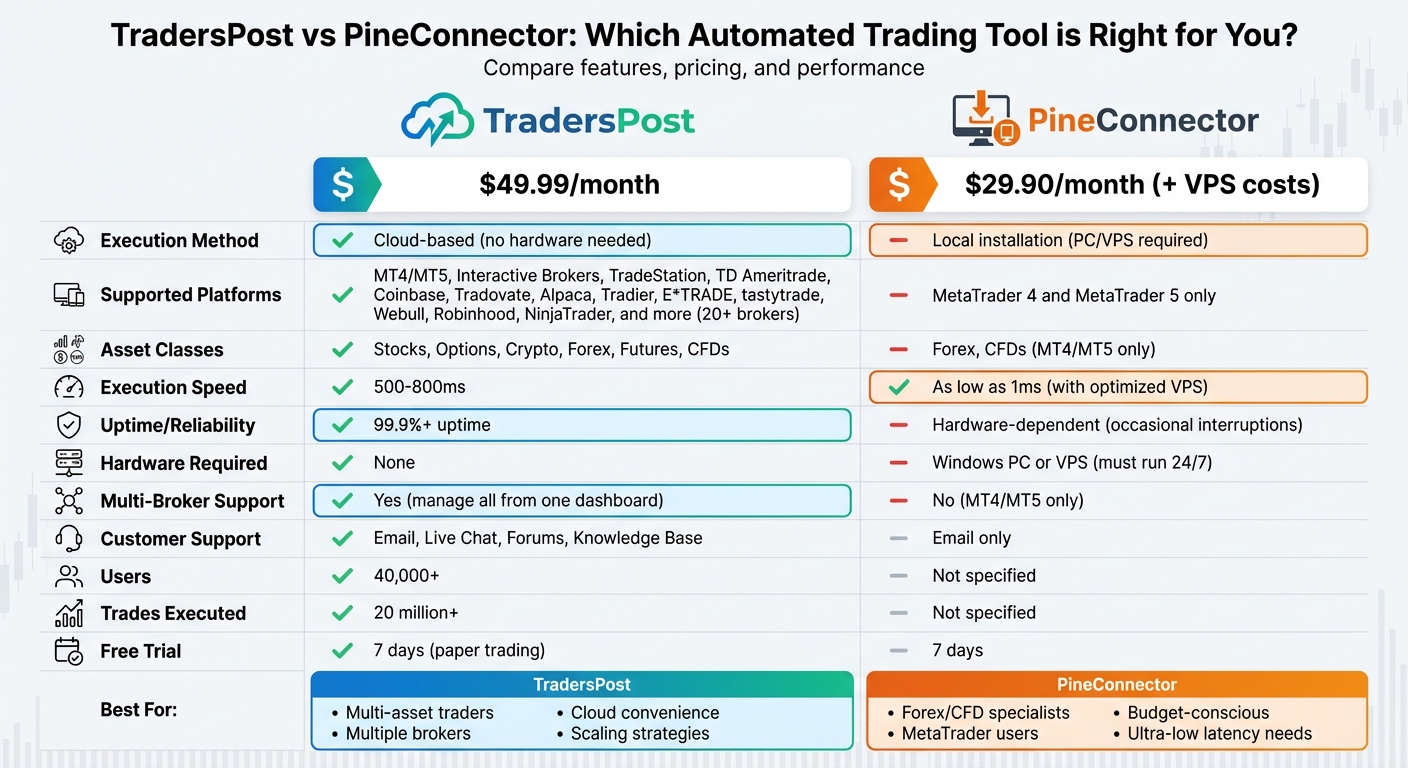
TradersPost vs PineConnector: Feature Comparison Chart for Automated Trading
PineConnector 101: Getting Started – TradingView to MetaTrader (MT4/MT5)

What is TradersPost?
TradersPost is a platform that automates alerts from TradingView and TrendSpider, sending orders directly to your broker. With over 40,000 users and 20 million trades executed across various markets – stocks, options, futures, forex, and crypto – it’s designed to simplify trading workflows.
Pricing begins at $49.99/month, and there’s a 7-day free trial for paper trading. Premium plans go up to $299/month. Since it’s cloud-based, there’s no need for a dedicated trading computer or VPS.
Features and Platform Support
TradersPost offers a wide range of features and supports numerous brokers and exchanges, making it a versatile tool for traders.
The platform integrates with top U.S. brokers and crypto exchanges such as TradeStation, Tradovate, Interactive Brokers, Alpaca, TD Ameritrade, Tradier, E*TRADE, tastytrade, Webull, Coinbase, and Robinhood. It also connects to prop firm accounts via Tradovate and ProjectX, supporting platforms like Topstep and Apex. TradersPost processes webhook alerts and routes orders with impressive execution speeds of 500–800ms while maintaining over 99.9% uptime.
The unified dashboard lets you manage multiple strategies across asset classes. It includes essential risk controls like stop loss, take profit, and trailing stops. You can also execute multi-leg options orders and set conditional trade rules based on your portfolio. Features like unlimited webhook signals, live and paper trading modes, and fractional quantity support make it flexible for various trading styles. Additionally, advanced analytics provide performance insights across all connected accounts, helping you refine your strategies.
"Best platform for algorithmic trading. TradersPost takes the struggle out of having to code API’s to each broker and having consolidated subscriptions with extra rulesets based on the subscription preferences makes this top dog from all other platforms used." – Jonathan Haggas, TradersPost Customer
This integration and functionality make TradersPost a strong choice for traders with diverse strategies.
When to Use TradersPost
TradersPost shines when you’re managing multiple asset classes or strategies across different brokers. For instance, if you’re running a futures strategy on Tradovate, an options strategy on tastytrade, and a crypto strategy on Coinbase, TradersPost consolidates all your trading activities into one seamless platform.
The platform is especially useful for traders who need accessibility and reliability. One trader from Australia shared how TradersPost allowed him to automate U.S. market strategies despite time zone challenges. It’s also a great fit for strategy developers who want to test and deploy multiple Pine Script strategies without the hassle of coding individual API connections for each broker. Plus, the active Discord community and responsive support make it easy for non-technical users to get started.
What is PineConnector?
PineConnector is a tool designed to connect TradingView alerts with MetaTrader 4 and MetaTrader 5 platforms. Its main purpose is to streamline order execution by converting signals from your Pine Script strategies or indicators into actionable trades on MT4/MT5. It’s primarily geared toward forex and CFD trading. Unlike cloud-based options, PineConnector needs to be installed locally on your computer or set up on a Virtual Private Server (VPS) for continuous operation.
This platform is tailored for retail traders who want a straightforward way to automate their trading processes. At $29.90 per month, with a 7-day free trial, it provides an affordable entry point for those looking to automate their TradingView strategies without breaking the bank. Below, we’ll explore its features and the scenarios where it shines.
Features and Platform Support
PineConnector ensures fast communication between TradingView and MT4/MT5, transmitting alerts to your broker in just milliseconds. It supports essential order types like market and pending orders, along with vital risk management tools such as stop loss, take profit, and trailing stops. For more advanced strategies, you can use features like trailing stops based on ATR (Average True Range) or specific pip values.
The setup process leverages TradingView’s alert system with simple formatting, making it compatible with any Pine Script strategy. PineConnector allows you to manage up to 10 accounts and offers unlimited webhook signals for automated trading. Since it requires either your computer or a VPS to run continuously, choosing a VPS close to your broker’s server can lower latency to as little as 1ms, potentially saving up to 250ms per trade. The current MetaTrader 5 EA version is v3.52.0, as of December 11, 2025.
These capabilities make PineConnector a great fit for certain trading scenarios.
When to Use PineConnector
PineConnector is ideal for traders focused on forex or CFDs who need fast and reliable execution. It’s especially useful for those already working with MT4/MT5 brokers and looking to automate their TradingView strategies without switching platforms. At $29.90 per month, it’s an appealing choice for traders testing automation for the first time or those operating with smaller accounts.
However, if you trade across multiple asset classes like stocks, options, or cryptocurrencies, or if you need compatibility with a variety of broker platforms, PineConnector’s exclusive focus on MT4/MT5 might feel restrictive.
sbb-itb-24dd98f
TradersPost vs PineConnector: Direct Comparison
Now that you have a clear picture of what each tool offers individually, let’s put them side-by-side to see which one aligns better with your trading needs.
Execution Methods and Hardware Requirements
TradersPost operates entirely in the cloud, meaning you can execute orders from any device – even if your computer is turned off. PineConnector, on the other hand, requires you to install an Expert Advisor (EA) on a MetaTrader 4 or 5 terminal. This setup needs to run on Windows 10/11 or Windows Server 2016 (or later), and your computer or VPS must remain on continuously. This makes PineConnector’s performance heavily reliant on your hardware and internet connection. While PineConnector does offer a cloud option to host MT5 terminals remotely, this is an add-on to its core local EA model. For those using PineConnector, investing in a high-performance trading PC – like those from DayTradingComputers – can help ensure smooth execution. With TradersPost’s cloud architecture, however, these hardware concerns are eliminated entirely.
Platform and Broker Support
TradersPost stands out with its broad broker and platform compatibility. It supports MT4/MT5, Interactive Brokers, TradeStation, ThinkorSwim, TD Ameritrade, Alpaca, Tradier, Robinhood, E*TRADE, NinjaTrader, tastytrade, Webull, Kraken, Binance, Coinbase, Bybit, and ProjectX. It even integrates with prop firms like Topstep and Apex. This allows you to trade across stocks, futures, options, crypto, and forex – all from a single dashboard using TradingView alerts. PineConnector, however, is laser-focused on MetaTrader 4 and 5, making it ideal for traders specializing in forex and CFDs.
| Feature | TradersPost | PineConnector |
|---|---|---|
| Platforms Supported | MT4/MT5, Interactive Brokers, TradeStation, ThinkorSwim, TD Ameritrade, Alpaca, Tradier, Robinhood, E*TRADE, NinjaTrader, tastytrade, Webull, Kraken, Binance, Coinbase, Bybit, ProjectX, and prop firms | MetaTrader 4 and MetaTrader 5 |
| Primary Asset Classes | Stocks, futures, options, crypto, and forex | Forex/CFD (and options) |
| Multi-Broker Integration | Extensive | Limited (focused on MetaTrader only) |
Automation and Strategy Tools
Both platforms support key risk management features like stop loss, take profit, and trailing stops, along with the ability to handle unlimited webhook signals from TradingView. They also accommodate multi-leg orders, shorting, and fractional quantities. TradersPost offers a user-friendly cloud dashboard with advanced analytics, portfolio performance tracking, conditional order routing, and multi-broker position management. PineConnector, while capable of translating TradingView alerts into executable orders with full Pine Script support, offers a more technical interface and a basic analytics dashboard. When it comes to customer support, TradersPost provides multiple channels like email, live chat, community forums, and a detailed knowledge base. PineConnector, by comparison, limits support to email.
Speed and Reliability
TradersPost leverages its cloud-based infrastructure to deliver low-latency execution, with end-to-end times typically ranging from 500–800ms after an alert is triggered. It also ensures 99.9%+ uptime thanks to redundant systems, making it highly reliable. PineConnector’s speed depends on your local setup; with an optimized VPS, latency can be as low as 1ms, potentially saving up to 250ms per trade. However, its reliability depends on your hardware and connection, with occasional service interruptions reported.
| Feature | PineConnector | TradersPost |
|---|---|---|
| Execution Method | Local terminal execution | Cloud-based |
| Execution Speed | Dependent on local setup (as low as 1ms with an optimal VPS) | 500–800ms from alert trigger to broker submission |
| Reliability | Moderate, with occasional service interruptions | Highly reliable (99.9%+ uptime, redundant systems) |
| Hardware Dependency | High (requires local PC/VPS to be on) | None (independent of local hardware) |
For PineConnector users, a reliable, high-performance trading PC can help minimize hardware-related issues. TradersPost, however, bypasses these concerns entirely with its cloud-first design.
Pricing Comparison
PineConnector is priced at $29.90 per month and includes a 7-day free trial. However, you may need to budget for additional VPS costs to achieve optimal performance and 24/7 uptime. TradersPost, at $49.99 per month, also includes a 7-day free trial for paper trading. While its price is higher, it covers a robust cloud infrastructure, extensive multi-broker support, advanced analytics, and greater reliability. For traders managing diverse strategies, the added cost can translate to more flexibility and opportunities.
Choosing Between TradersPost and PineConnector
Your decision should hinge on your trading focus, hardware preferences, and budget.
Go with PineConnector if your trading revolves around forex or CFDs via MetaTrader 4 or 5, and you’re comfortable managing a local installation or VPS. It’s priced at $29.90/month, but keep in mind that VPS hosting for the Cloud Add-on starts at $39.99/month. A local setup demands continuous operation, and your hardware’s performance will directly affect processing speeds. However, if you need flexibility across multiple assets and brokers, consider the next option.
Opt for TradersPost if you trade a variety of assets – stocks, futures, options, crypto, or forex – and want to manage positions across multiple brokers from a single dashboard. While it costs $49.99/month, you get cloud execution with over 99.9% uptime and no dependency on your hardware. You can trade from any device, even when your computer is off, making it a great pick for those prioritizing flexibility and reliability over cost.
DayTradingComputers provides high-performance systems tailored for automated trading. Even though TradersPost lets you operate from any device, a dedicated trading PC can still enhance your experience, especially if you’re juggling multiple charts and platforms.
The market is shifting toward cloud-based solutions, leaving locally installed software like PineConnector at a disadvantage compared to more adaptable options. If you’re aiming to scale your trading across various strategies and brokers, TradersPost offers the infrastructure to support that growth. On the other hand, if your focus is solely on MetaTrader and you’re seeking a budget-friendly entry point, PineConnector is a solid pick – just remember that hardware investment is necessary for peak performance.
FAQs
How do TradersPost and PineConnector differ in broker compatibility?
TradersPost stands out with its extensive broker compatibility, supporting well-known platforms such as TradeStation, Tradovate, Alpaca, Interactive Brokers, TD Ameritrade, Coinbase, and Robinhood. This broad range makes it an appealing option for traders who work across multiple platforms.
In contrast, PineConnector focuses on the MetaTrader ecosystem, specifically MetaTrader 4 and MetaTrader 5. While its broker support is more limited, it’s an excellent choice for those who primarily depend on MetaTrader for their trading activities.
Which platform offers better execution speed and reliability: TradersPost or PineConnector?
TradersPost stands out for its quick execution speed and strong reliability when compared to PineConnector. Built on advanced cloud-based infrastructure, it significantly cuts down on latency and lowers the risk of system errors, offering a smoother and more dependable trading experience. On top of that, TradersPost works with a broad selection of brokers, making it a flexible option for automated trading strategies.
Which platform works best for traders managing multiple asset types?
TradersPost stands out as a great option for traders working with a variety of asset types, such as stocks, futures, options, and cryptocurrency. With its wide broker compatibility and powerful analytics, it simplifies managing multiple strategies across different markets. This makes it easier for traders to organize their workflows and improve their performance across various asset classes.